Catch the moment.
Load a WAV or capture up to thirty seconds of computer playback into a layer. Start with a record, a texture, a voice or a happy accident.
LOAD / SAMPLEMAKE SOMETHING OUT OF ANYTHING.
Catch a sound. Cut it up. Slow it down. Build something you couldn’t have planned.
Sixteen layers and a hands-on sampling workflow. Use the macOS plug-in in your DAW, or make a complete project with the standalone Android app.
 SIXTEEN LAYERS.
Free access through 28 April 2027 · Email sign-up · No card
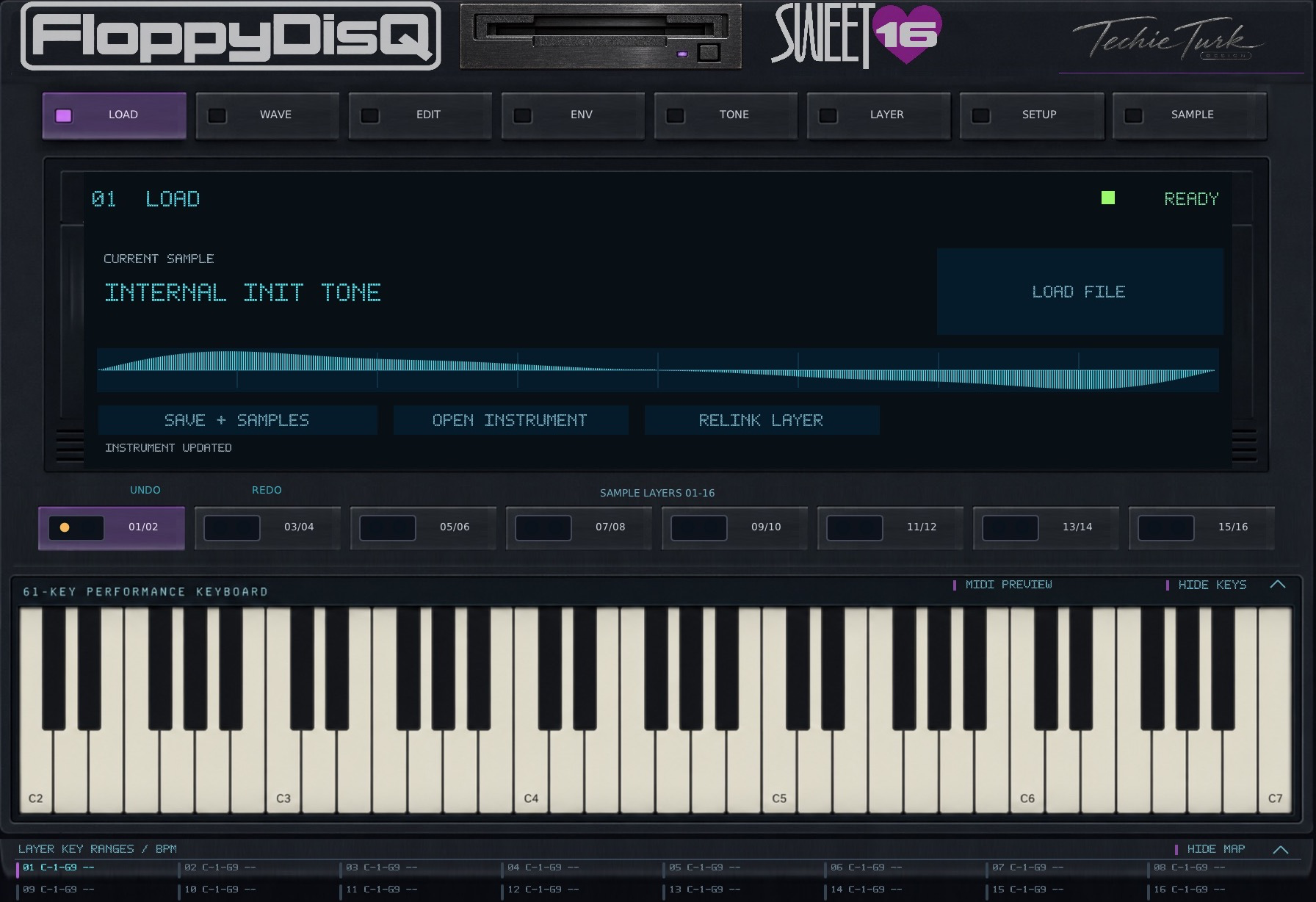
THE GOOD PART IS WHAT YOU DO WITH IT.
01—04Record a moment, turn it into an instrument, then make it move. The controls stay close to the music.
Load a WAV or capture up to thirty seconds of computer playback into a layer. Start with a record, a texture, a voice or a happy accident.
LOAD / SAMPLETrim sample and loop points, normalize, reverse or autochop transients into playable slices. Keep the original recording while you explore.
WAVE / EDITClassic playback links pitch and duration. Stretch separates them. Sync follows your track’s tempo, with Drum, Melodic and Complex profiles.
TIME ENGINEMap sixteen layers across keys and velocities. Shape envelopes, blend layers, filter the edges, add lo-fi grain or bring movement with an LFO.
ENV / TONE / LAYERGET YOUR HANDS ON IT.
UI ONLY / NO AUDIO ENGINESwitch pages, move the sliders and explore the layout. This browser preview is silent; the plug-in does the sound.
The whole instrument fits your screen. Expand the preview for a closer look.
The interface preview uses the plug-in’s artwork and layout. Expand it for a closer look on smaller screens.
THE NEXT CHAPTER / PLANNED DEVELOPMENT
Intelligent wave analysis is the next direction: useful musical information, with you still making the decisions.
BPM estimation and transient autochop are already part of the instrument. These are planned improvements and research directions, with no announced release date.
Explore stronger tempo and beat-position analysis, including the half-time and double-time ambiguity that can make loops tricky.
More sensitive attack detection, musical slice suggestions and candidate loop boundaries. Suggestions stay editable.
Explore root-note suggestions and ways to distinguish percussive, melodic and mixed material to guide mapping and Time Engine choices.
TWO PLATFORMS. TWO WAYS TO PLAY.
Choose your platform below. Both builds share one free six-month license, expiring 28 April 2027. Sign up with your email to download. No payment or subscription.
This is a fixed public expiry date, not six months from installation. Development builds: save backups and test with your own device and host.
ONE EMAIL. BOTH PLATFORMS.
Verify your email to unlock both free downloads and the shared license key. Returning users can sign in with the same email.
Access ends 28 April 2027 for everyone. No card or subscription. We use your email to verify access; signing up does not subscribe you to marketing emails.
Choose macOS or Android below. You can download both.
Checking sign-in…
AU + VST3 · requires a compatible DAW
Play FloppyDisQ inside Logic Pro with the AU, or a VST3 host. This download is a desktop instrument plug-in, not the Android DAW.
Ad-hoc signed development build; not notarized. Windows and Linux plug-ins are not included.
Requires desktop v0.22.13 or newer for this six-month key. macOS may ask you to approve opening software from an unidentified developer.
Sampler + DAW + step sequencer
Make music directly on your phone or tablet. No desktop DAW required. This is an Android APK, not a VST or an iPhone app.
Development APK, installed directly rather than through Google Play. The same public key is activated automatically; audio access expires on 28 April 2027.
System-audio sampling requires Android 10+ and a source app that permits capture. Export project backups before uninstalling or clearing app data. Bluetooth headphones may add noticeable delay.
This private link expires after five minutes. Select your platform again to get a fresh link.
ONE SHARED KEY. THE SAME EXPIRY FOR EVERYONE.
Use this key to activate the macOS plug-in. Android already includes it. When the key expires, playback and recording stop; your saved projects and sample files are retained.
AI provider credits and third-party sample libraries are separate. There is no payment or automatic renewal.
OPTIONAL SUPPORTER DOWNLOAD.
If FloppyDisQ earns a place in your setup, you can choose to pay for the current beta download to support ongoing development.
The same Mac and Android builds remain free after email sign-up. Paying is optional.
$0 minimum
$5 suggested · One-time · USD
Get the supporter download ↗Includes the current macOS AU/VST3 installer, Android APK, activation key and installation notes, delivered through Lemon Squeezy.
Same fixed expiry: 28 April 2027 at 07:34:39 UTC. Payment does not extend access or buy a lifetime license. No subscription, automatic renewal or guarantee of future builds. Applicable taxes may be added at checkout.
KEEP YOUR INSTRUMENT CURRENT.
Check your installed Android or macOS version. Downloading an update keeps the same public license expiry.
Read the instrument guide ↗
MEET NAVI.
Navi’s optional local control link lets a connected assistant help with layers, mappings and sound settings. The link shares metadata, including sample filenames, without sending audio to ChatGPT.
Optional API chat uses your own provider key. The separate Mac AI sample-generation prototype can upload source audio and requires provider credits.
A FEW THINGS TO KNOW.
Choose Android for a standalone phone/tablet app with its own DAW, mixer and sequencer. Choose macOS for AU/VST3 instrument plug-ins running inside a desktop DAW. The APK cannot run on a Mac or iPhone, and this VST3 download is for macOS only.
Everyone uses the same signed public key, expiring on 28 April 2027. Installing later or updating does not restart the six months. No payment is required, and there is no subscription or automatic renewal. An optional supporter purchase does not extend access. When it expires, audio playback and recording stop. Your projects remain available for backup; a replacement owner-issued key can restore audio access.
Enter your email, request a code and verify it here. The same verified account unlocks both macOS and Android downloads. Returning users use the same email and a fresh code; no password is needed. Older trial expiry does not prevent access to this free release.
The platforms have different project formats and workflows. WAV samples can be transferred, but complete Android DAW projects are not desktop plug-in presets.
These are free development builds. The Mac bundles are not notarized, and the APK is installed directly rather than through Google Play. Device, DAW and instrument-pack compatibility testing is ongoing. Keep backups of important sessions.
With your permission, Google Analytics measures visits and product interactions, such as downloads, preview use and update checks. It does not receive your license key, audio or project files. Advertising personalization is disabled. Declining analytics does not affect downloads. You can change your choice in the footer. See Google’s privacy policy.